Skip to content
Home
Features
Close Features
Open Features
Operations
Point of Sale
Seamless Mobile Order & Pay
Payments
Cliqbux Dashboard App
Team Management
Tips
Smart Online Solution
Websites
Online Ordering
Marketing
Loyalty
Gift Cards
Tables
Restaurant Operations
Multi-Site Management
Supply & Accounting Solution
Inventory Management
Products
Close Products
Open Products
Point of Sale
Kiosk
MPOS
About
Contact
Blog
FAQ
Facebook-f
Instagram
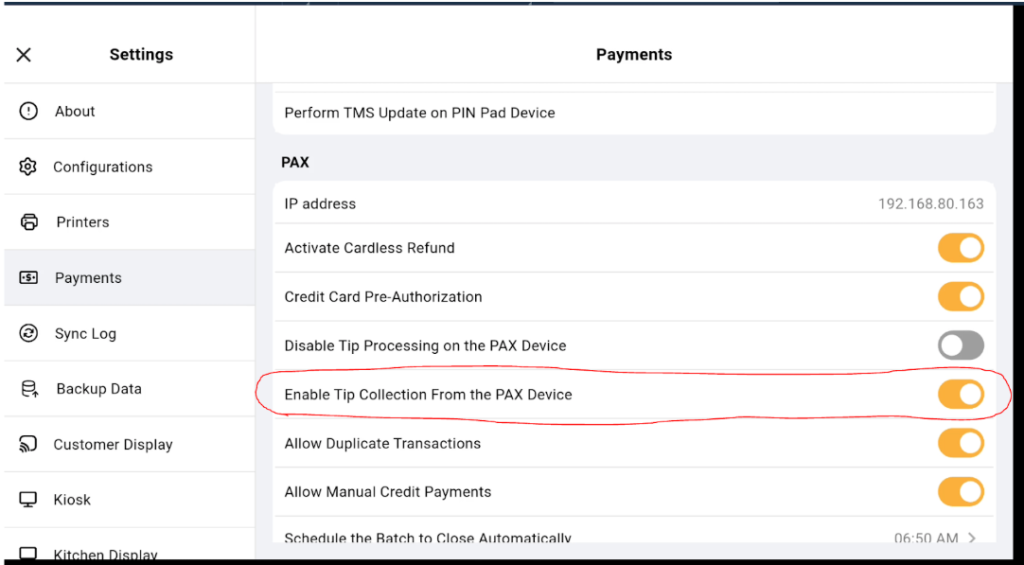
⚠️ Enable Tip on Pax Device – Troubleshooting Guide
Step1. Go to Cliqbux POS and login your pin
Step 2. Go to settings > Payments
Step 3. Enable “Enable Tip Collection From the Pax Device”
Prev
Previous
How to close Batch using Pax
Next
Error code on Pax
Next
Home
Features
Products
About
Contact
Blog
FAQ
Facebook-f
Instagram
Features
Operations
Point of Sale
Seamless Mobile Order & Pay
Payments
Cliqbux Dashboard App
Team Management
Tips
Smart Online Solution
Websites
Online Ordering
Marketing
Loyalty
Gift Cards
Tables
Restaurant Operations
Multi-Site Management
Supply & Accounting Solution
Inventory Management
Products
Point of Sale
Kiosk
MPOS